


Go Program Way2Go Card
3.524.40K Reviews
App Specs
- Version
- 3.3.5
- Updated On
- License
- Free
- Downloads
- 1,000,000+
- Developer
- Conduent Incorporated
- Categories
- Finance
- Platform
- Android, iOS
Screenshots
 Analysis by AppCompare
If you have been issued a Way2Go Card and want a simple way to keep an eye on the money attached to it, Go Program Way2Go Card is built for that narrow, practical job. I approached it as a first-time cardholder would: install it, work through the opening screens, look for the available balance, and then check whether the transaction history is useful enough for everyday decisions. My overall impression is that it is more of a card-management companion than a complete personal-finance app. That distinction matters, because its value comes from making one specific account easier to monitor rather than trying to replace a bank app.
The app is free, rated for Everyone, and developed by Conduent Incorporated. It belongs to the finance category, but I would not compare it directly with a full budgeting service. Its purpose is much more focused: helping you view your available balance, review activity, and stay oriented around the card. The listing shows a 3.5 average from roughly 58 thousand ratings, with more than a million installs, so it has clearly reached a large audience while also receiving a mixed response. I think that combination is a useful warning to set expectations properly: the app can be handy when it works smoothly, but it is not the sort of tool I would install expecting a rich financial dashboard.
What to expect before you begin
Go Program Way2Go Card makes the most sense when the card itself is already part of your routine. For example, imagine receiving a benefit payment or another deposit connected to the card and needing to know whether enough money is available before buying groceries. Instead of checking by guesswork, I would open the app, look at the available balance, and then inspect recent activity if the amount seems different from what I expected. That is the core everyday success this app should provide.
The important word is “available.” A current balance and the amount you can actually spend are not always the same thing in financial products. When I use a card-management app, I treat the available figure as the number to consult before a purchase, while the activity list helps me understand why it changed. I would not use the app as my only long-term record of spending. For budgeting, I would still keep a separate note or use a dedicated budgeting tool, especially if I need categories, recurring expenses, savings goals, or several accounts in one place.
The experience is also different from a normal bank application. A bank app usually brings together checking, savings, transfers, bill payments, statements, and other services. Go Program Way2Go Card is intentionally narrower. That can be an advantage if you do not want unrelated financial features competing for attention, but it can feel limited if you expect one app to show your entire financial life.
One practical point is worth keeping in mind before installing: this is for people who have a compatible Way2Go Card relationship. If you do not have that card or the account details needed to access it, the app is unlikely to become useful simply because it is free. I would first make sure I have the card nearby and that I can identify the information used during registration. Having those details ready makes the first session less frustrating.
Installing it and getting oriented
The app has been available since August 14, 2015, and the current version is 3.3.5. It requires iOS 10 or later, so people using a very old Apple device should check compatibility before planning around it. Once installed, I would avoid treating the first screen as a place to explore casually. Finance apps are easier to set up when you move deliberately: read each prompt, enter the card information carefully, and stop to check any confirmation message before continuing.
Worth Reading Before You Choose

EA SPORTS FC Mobile 26 Is a Bigger Football Game, but It Takes Time

Flipboard Shows What News Apps Must Do Beyond the Feed

Switching to Android Auto Means Rethinking Your Driving Routine

Google Calendar Makes a Crowded Week Easier to Manage

Ludo King Makes the Most of the Minutes Between Plans

Baby Panda World Brings Quick Play to Modern Phones, but Its Game Library Feels Busy
I also recommend using the first launch to decide what “success” means for you. If your goal is simply to confirm that a deposit arrived, do not spend time looking for budgeting tools that may not be part of this focused experience. If your goal is to investigate a confusing purchase, plan to use both the balance view and the transaction activity rather than relying on one screen. This small change in approach makes the app feel more capable because you are using each area for the job it is best suited to perform.
For privacy and security, I would use the app on a device you control and avoid entering card information while connected to an untrusted public network. I would also keep the app and the device's operating system maintained when updates are available. Those are ordinary precautions, but they matter more when an application is connected to accessible funds. I would never send a screenshot of the balance or transaction list to someone who does not need to see it.
Setting up the account without rushing
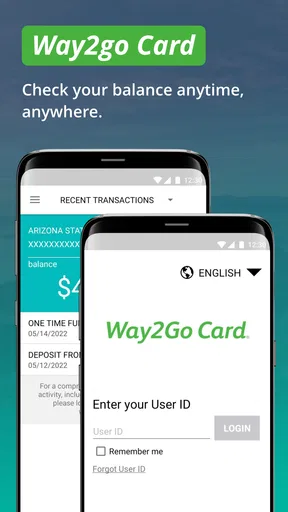
The first setup is the point at which patience pays off. Have the physical card available, use the exact personal details associated with it, and check every digit before submitting a form. A single mistyped number can turn a straightforward registration into a confusing error, and the error may look like an account problem when it is really an entry problem.
I would also distinguish between registering the app and proving that the card itself is active. The app can help you monitor the card, but it should not be treated as a substitute for resolving an activation or account-access issue through the appropriate card support channel. If the card is new, I would complete any required card instructions first, then return to the app. That order gives you a clearer way to tell whether a problem comes from the card or from the mobile login.
When the setup succeeds, my next move would be to confirm that the displayed account is the one I expected. This is an easy step to skip, particularly if the interface looks simple. I would compare the visible identifying details with the card in my hand and then check whether the balance makes sense. If the balance is unfamiliar, I would not immediately assume the app is wrong; I would open the activity view and look for a recent deposit, purchase, adjustment, or other entry that explains it.
A useful habit is to complete setup when you are not standing in a checkout line. Registering while distracted creates unnecessary pressure, and a failed attempt at the exact moment you need the balance can make the whole service seem unreliable. I would do the initial login at home, then use the app later for quick checks. That is a small workflow improvement, but it is particularly valuable for a focused financial app where the main benefit is fast access when you need reassurance.
The first meaningful action: verify a balance and trace it
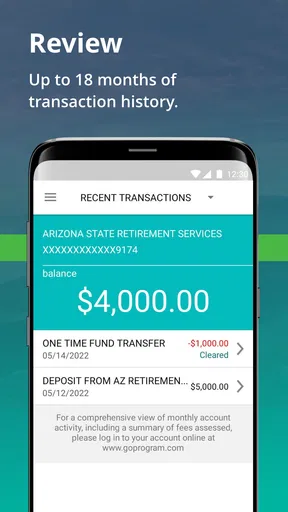
For me, the first successful action is not merely opening the home screen. It is answering a real question: “How much can I use right now, and what changed it?” I would start by reading the available balance, then move immediately to transaction activity. If the two views tell a coherent story, the setup has done its job.
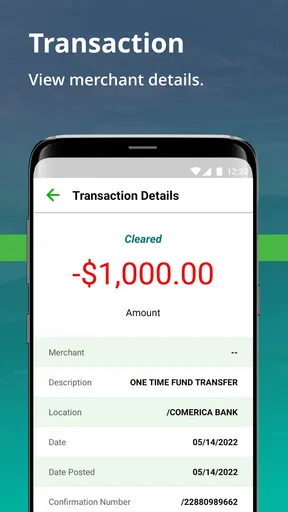
Here is a realistic example. Suppose I remember making a purchase yesterday but the balance looks lower than expected. I would not repeatedly refresh without a plan. I would scan the activity for the merchant or amount, check whether another recent transaction explains the difference, and note whether the entry appears pending or completed if the interface distinguishes those states. If I still cannot reconcile the figures, I would record the date, amount, and description before contacting support. Having those details ready is much more effective than saying only that “the balance looks wrong.”
This is one of the app's less obvious strengths: it can turn a vague money worry into a small investigation. The balance answers the immediate spending question, while the activity list gives you a trail to follow. I would use that trail after deposits too. When money is expected, checking the balance alone confirms the result; checking activity can help confirm that the deposit appears as the kind of entry you expected.
I would make the first successful check part of a routine. Before a planned purchase, glance at the balance. After an unfamiliar notification or receipt, review activity. At the end of a busy day, use the list to spot anything that deserves attention. This is not a replacement for reconciling a full budget, but it is a lightweight control that can prevent avoidable surprises.
Another practical tip is to avoid judging the app from a single delayed-looking entry. Financial activity can take time to appear or change status, and the app's role is to show what is available and what activity is presented at that moment. If a transaction seems out of place, I would note when I checked, compare it with the receipt, and check again later rather than making an immediate assumption. If the discrepancy remains, escalate it with specific information.
Where new users can get confused
The most common confusion is likely to come from treating the app as a general bank account manager. Its name and finance classification may lead some people to expect transfers, bill payment, spending charts, or support for unrelated cards. I would install it with a much narrower expectation: it is a way to monitor the Way2Go Card, not a universal wallet for every account you own.
A second source of confusion is the difference between seeing activity and changing an account. An activity screen can show that something happened, but that does not mean the app gives you a way to reverse, dispute, or edit the transaction directly. When I see an unfamiliar entry, I would use the app to gather the facts first, then follow the relevant support process rather than repeatedly tapping the transaction and expecting a correction tool to appear.
There is also a human-factor issue with balance checking. A person may see a number and assume it includes every purchase made moments ago. I would leave room for timing differences and compare the balance with the activity list. This is especially important when making a purchase that would use nearly all available funds. In that situation, I would avoid relying on a rough mental estimate and would check the displayed amount immediately before paying.
Login trouble can be equally misleading. If a sign-in attempt fails, I would first check basic details such as the card information and typing accuracy rather than creating repeated attempts in quick succession. I would also make sure I am using the correct app and a supported device environment. If the problem continues, documenting the exact message and the steps already tried will make the next support conversation clearer.
The mixed rating is relevant here, but I would not read it as a verdict that the app is unusable. A finance app can be valuable to one person and frustrating to another depending on device age, account status, login circumstances, and what that person expects it to do. My own standard is simple: can I reach the account view, understand the available balance, and use activity to investigate changes? If yes, the focused design may be enough. If I need broader financial management, the limitations become more important.
Small habits that make the app more useful
I would keep a separate record for important disputes or recurring expenses. The app is convenient for checking current information, but a personal note containing dates, amounts, and merchant names gives me a stable reference when I need to compare several transactions. This is particularly useful if I are tracking a series of purchases over a week and do not want to depend on memory.
I would also use transaction activity as a prompt for safer card habits. If I notice an entry I do not recognize, I would act promptly rather than waiting until the end of the month. If a family member helps with purchases, I would agree on a simple way to identify legitimate transactions. The app cannot replace communication or careful account handling, but its activity view can make those conversations concrete.
Finally, I would avoid leaving the app open when lending my phone to someone else. A quick balance check is convenient, but it can reveal sensitive financial information. Device-level privacy features and sensible screen habits matter just as much as the app's own interface. That is an easy detail to overlook because the app feels simple, yet simplicity does not make the information unimportant.
Who should use it, and who should choose something else?
I would recommend Go Program Way2Go Card to a cardholder who mainly wants fast visibility into available funds and recent transactions. It is especially suitable for someone who does not need charts or complex categories and prefers a dedicated place to answer basic account questions. A first-time user can get meaningful value from it after one successful setup and one deliberate balance-and-activity check.
I would be more cautious if you manage several bank accounts, want automatic budgeting, or need detailed monthly reports. A conventional bank app may be better when your financial life is already centered on checking and savings accounts. A budgeting app may be better when the goal is planning future spending rather than monitoring one card. In those cases, this app could still serve as a companion for the Way2Go Card, but I would not make it the center of the whole system.
I would also skip it if you do not have a compatible card relationship. Installing a free finance app is not useful by itself, and the focused design means there is little reason to keep it around for general financial education or expense tracking. Its value is tied to the card-monitoring task, so the right question is not whether it has many features, but whether those particular features match your immediate need.
Compared with checking a balance through a phone number, website, or another card-access method, a dedicated mobile app can feel quicker when you are already holding your phone. Compared with a full bank app, however, it is less of an all-in-one financial home. That trade-off is the clearest way to understand the product: less breadth, potentially less clutter, and a direct path to the information cardholders usually check first.
My next-step recommendation
After installing it, I would not try to master every screen at once. I would complete the registration carefully, confirm that the correct card is connected, read the available balance, and open transaction activity. Then I would close the app and repeat the check later after a normal purchase or deposit. That second visit tells you more than the first because it shows whether the app fits an actual routine rather than merely completing setup.
If the balance and activity answer your questions clearly, keep using it as a focused monitoring tool. Set a personal habit around checking before important purchases and reviewing unfamiliar entries promptly. If the app does not meet your needs, identify the missing job: full budgeting, multiple accounts, bill payments, or something else. That will point you toward a bank app or budgeting service instead of encouraging you to force this narrower tool into a role it was not designed to fill.
My final view is positive but measured. Go Program Way2Go Card is not an ambitious finance suite, and that is both its limitation and its reason for existing. For the right cardholder, the most useful path is simple: sign in, verify the available balance, trace changes through activity, and keep a separate record for anything important. With that expectation, the free app can be a practical everyday companion. With expectations of full financial management, it will likely feel too restricted.
Pros
- Quickly check your Way2Go Card balance and recent transactions.
- Mobile access makes it easier to manage benefits while traveling.
- Card controls can help monitor spending and identify unfamiliar activity.
- Useful account details are available without calling customer service.
- Supports better budgeting by showing available funds in one place.
Cons
- Some features may vary depending on your state or card program.
- App access depends on a working internet connection.
- Users may need to contact support for certain account changes.
- Login or verification issues can delay access to card information.
- Not all benefit programs or card types may be supported.
FAQs for Go Program Way2Go Card
What is the Go Program Way2Go Card app used for?
The Go Program Way2Go Card app is designed to help eligible cardholders manage government-issued benefit payments, such as unemployment or other assistance funds, when those payments are loaded onto a Way2Go Card. After signing in, users can generally review their available balance, transaction history, payment activity, and important card information without needing to call customer service for every routine inquiry.
How do I log in to the Go Program Way2Go Card app?
To use the app, you normally need to register or sign in with the information requested for your Way2Go Card account. Depending on your program and state, this may include your card details, personal identification information, username, password, or security verification. If you forget your credentials, use the official recovery options in the app rather than creating multiple accounts, as repeated failed attempts may temporarily restrict access.
Can I use the app to check my Way2Go Card balance and transactions?
Yes, checking your balance and reviewing recent transactions are among the main reasons to use the Go Program Way2Go Card app. The displayed balance should help you understand how much is currently available, while transaction history can help identify deposits, purchases, withdrawals, fees, or unfamiliar activity. Allow a short time for newly processed transactions or payments to appear.
Can I transfer money or manage card settings through the app?
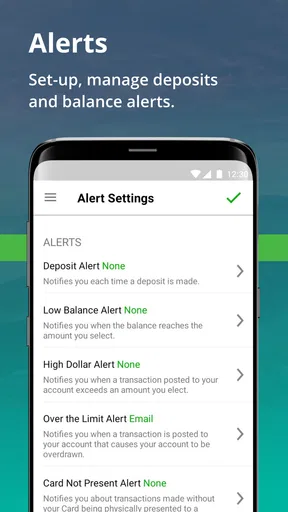
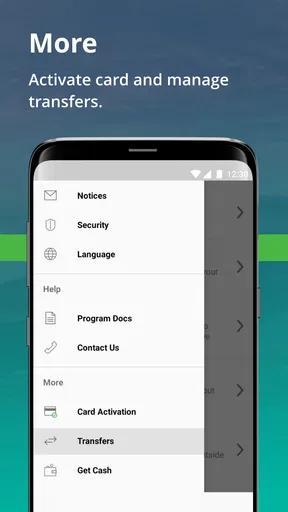
The available money-management features can vary according to the government program and the state or agency that issued your card. In supported accounts, the app may provide options related to transfers, direct deposit information, card controls, notifications, or account preferences. Not every feature is available to every cardholder, so the options shown after login are the best indication of what your account supports.
Is the Go Program Way2Go Card app safe, and what should I do if I notice suspicious activity?
The app is intended to provide secure access to your Way2Go Card account, but users should still protect their login details, avoid sharing verification codes, and install updates only from the official Google Play Store or Apple App Store. If you see an unfamiliar transaction, lose your card, or suspect unauthorized access, contact the official Way2Go Card customer-service number or your issuing agency immediately.


